
Slack Integration
Slack + Diaphora
Launch Diaphora plans, browse results, and get completion DMs without leaving Slack.
Overview
How the Slack app works
The Slack integration turns Diaphora into an in-channel workflow layer. Teams can search plans, run them from modals, inspect result documents, and get direct-message follow-ups when longer jobs complete.
Slack becomes the front door for Diaphora. A teammate opens Diaphora Studio, chooses a workflow, launches it from a modal, checks recent results, and receives a direct message when the final output is ready to read.
The result is a fast, low-friction workflow loop: discover a plan, run it in context, and review the output without asking people to jump between tools until they are ready.
Walkthrough
Slack in action
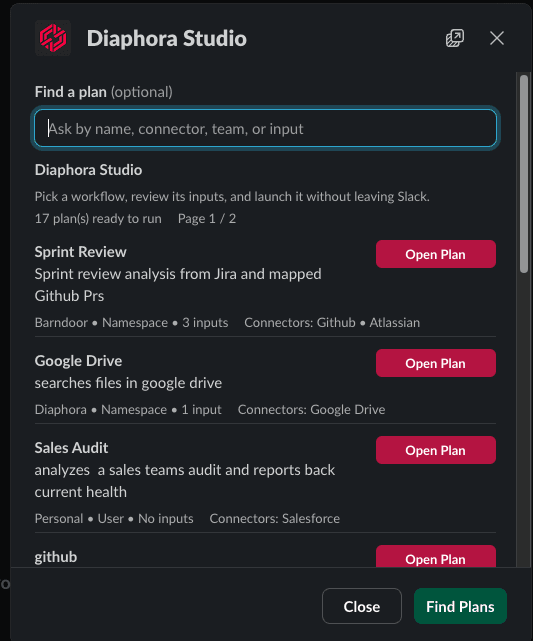
Open Diaphora Studio in Slack to search plans by name, connector, team, or expected input.
Screen 1 of 4
Setup
Slack integration setup
A guided setup flow for the Slack app is on the way. For now, the walkthrough below shows how the integration behaves once it is connected.
Coming soon
The full setup path for this integration is being documented next.
How it works
Working with the integration
1. Connect Diaphora to Slack
The first run starts with account linking. Once OAuth is complete, Slack can launch plans and read back result history on behalf of the user.
- The connection page returns the user to a Diaphora-branded confirmation screen.
- Linked sessions let the bot browse plans, fetch results, and trigger runs without extra prompts.
2. Search and launch a workflow from Diaphora Studio
The Diaphora Studio modal surfaces plans in a compact browser optimized for Slack. Users can search by workflow name, connector, or use case, then open a plan and supply the needed inputs.
- The launcher keeps the plan catalog close to the conversation where the work started.
- Each plan modal shows the plan description, required inputs, and a clear action to launch.
3. Review runs in the result browser
Slack also exposes a result browser so recent runs are easy to revisit. Search narrows the list, and each row opens into a result details view.
- Result browsing works well for recurring workflows like call prep, sprint review, or weekly audits.
- Users can inspect run IDs and timestamps before leaving Slack.
4. Read the rendered document inside Slack
When a result includes a Diaphora document, the details modal renders that narrative output directly. This makes the experience feel like opening a finished brief, not a raw JSON blob.
- Structured payloads still exist under the hood, but the user sees the narrative artifact first.
- A single click opens the full result in Diaphora for deeper exploration.
5. Let long-running plans finish in the background
Some runs take a few minutes. The Slack integration queues those executions and sends a direct message when the result is ready, so users can get back to the rest of their day.
- The completion DM includes a link straight into Diaphora Results.
- This keeps Slack responsive while still closing the loop on the workflow.